What is your developer-dependent CMS actually costing you? Calculate your costs and get a full report


Search
Search for People and for AI Agents
People type a word or two into a search box; AI agents ask full questions. How the Agility docs serve both from one content pipeline, with Algolia for people and Azure AI Search for agents.
People and AI agents both search your content, but they search in very different ways. A person types a word or two into a search box, often misspelled, and expects results as they type. An AI agent asks a full question and wants passages it can read and cite. One search setup is rarely the best at both.
The Agility docs now use two engines fed by the same content pipeline: Algolia behind the search box on this site, and Azure AI Search with hybrid keyword and vector search behind the Knowledgebase MCP server that AI agents call. This article explains why, how it's built, and what we learned putting it into production.
It builds on AI Search Explained, which covers what keyword, vector, hybrid and semantic ranking each do.
How people and agents search differently
| People in a search box | AI agents and chatbots | |
|---|---|---|
| Typical query | One to three words: webhooks, sla, web stu | A full question, often 6 to 13 words |
| Typos and half-typed words | Common | Rare |
| Searches per question | One per keystroke | One or a few |
| Latency | Every keystroke, so tens of milliseconds matter | Small next to the model's own time |
| What they need back | A short list of pages to click | Passages to read, with URLs to cite |
| How you learn what they're missing | Zero-result searches and clicks | What they search again, and what they fetch |
We tested both on the Agility docs, each with its own test set written before any engine was scored: 36 queries copied as people typed them into the docs search box, and 51 questions phrased the way agents ask them.
| People: search-box queries (MRR) | Agents: questions in sentences (MRR) | |
|---|---|---|
| Algolia, with its search-box defaults | 0.886, about 50 ms | 0.291 |
| Algolia, with settings for sentences | 0.821 | 0.587 |
| Azure AI Search, keyword only | 0.718 | 0.762 |
| Azure AI Search, hybrid (keyword + vector) | 0.824, about 220 ms | 0.853 |
MRR rewards putting the right page first: 1 for first place, 0.5 for second, and so on, averaged over all queries. AI Search Explained has the full tables and which differences are statistically real.
Two things stand out:
- Algolia's defaults are built for people. Typo tolerance and prefix matching handled misspelled and half-typed queries with no setup, at search-box speed. The same defaults found the right page for only 18 of 51 agent questions in the top five, because by default every word in a sentence must match.
- Hybrid search is built for questions. It found the right page first for 40 of 51 agent questions, against 25 for Algolia with settings tuned for sentences. On search-box queries, Azure only caught up with Algolia after rewriting each query for typos and prefixes, and hybrid search took about five times as long per keystroke.
So each audience gets the engine that measured best for it.
How it fits together
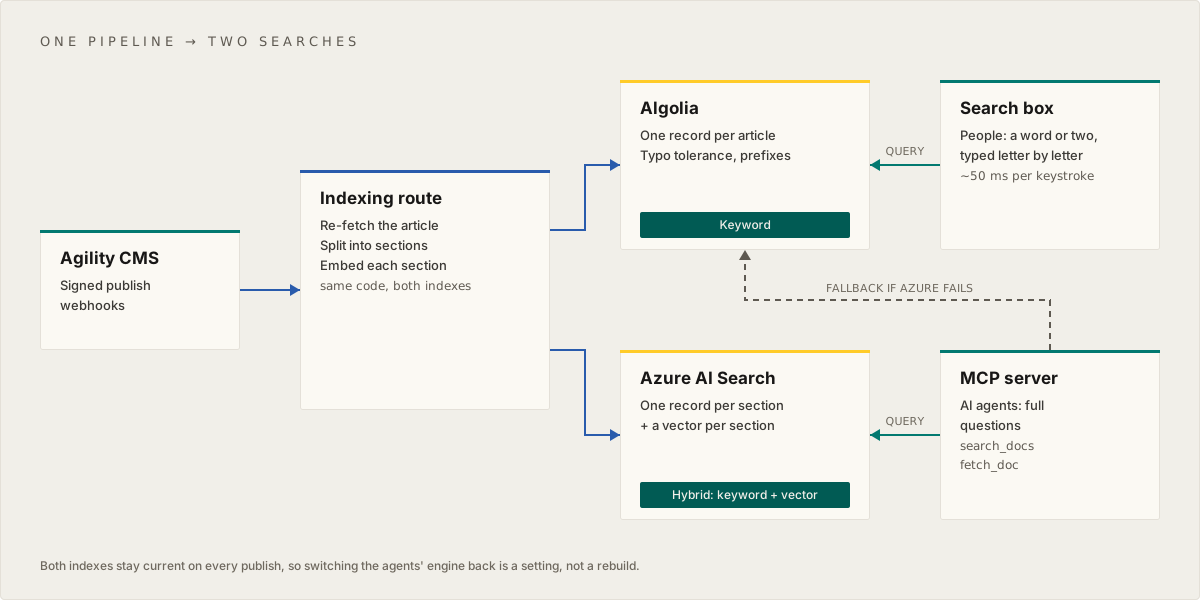
- One indexing pipeline. The publish webhook and the full reindex read each article once from Agility and write it to both indexes: Algolia gets one record per article, Azure gets one record per section with a vector. Indexing Agility Content for Search covers the pipeline; an Azure failure is logged and never blocks the Algolia update.
- The search box queries Algolia from the browser with a search-only key, exactly as before.
- The MCP server's
search_docstool queries Azure with hybrid search through one module, so the engine is a setting rather than a code change.fetch_docreturns the article's Markdown, whichever engine found it. - The ids stay the same. Both indexes use the Agility content ID, so an id an agent got from one engine still works with
fetch_doc.
Build the agent side
Use hybrid search, and leave the semantic ranker off
Run a keyword query and a vector query together and let the engine merge them. Azure AI Search shows the full route. On our content, adding Azure's semantic ranker on top made the order slightly worse (the right page first for 34 questions instead of 40), while adding latency, cost per query, and a monthly limit after which it fails. We keep it off. Turn it on only if you need its 0 to 4 score, for example for a chatbot's refusal threshold.
Fall back instead of failing
Agents can't do anything useful with a search error, so the agent search never returns one if another engine can answer. Keep your existing site search as the fallback:
// lib/search/agent-search.ts
export type Hit = { id: string; title: string; url: string; snippet: string }
export type AgentSearchResult = { engine: "azure" | "algolia"; hits: Hit[]; fallback?: string }

declare function searchAzureHybrid(query: string): Promise<Hit[]> // keyword + vector, no semantic ranker
declare function searchAlgolia(query: string): Promise<Hit[]> // your existing site search index

export async function searchForAgents(query: string): Promise<AgentSearchResult> {
  if (process.env.AGENT_SEARCH_ENGINE !== "azure") return { engine: "algolia", hits: await searchAlgolia(query) }
  try {
    return { engine: "azure", hits: await searchAzureHybrid(query) }
  } catch (err) {
    // Log it and record it on your telemetry event: a fallback that nobody sees can last for weeks
    console.error("Agent search: Azure failed, answering from Algolia", err)
    return { engine: "algolia", hits: await searchAlgolia(query), fallback: String(err) }
  }
}
Make sure "failed" really throws. If your code calls the REST API and treats a 404 as "no results", a wrong index name looks like an empty result instead of an error, and the fallback never runs. The same goes for looking up an article by id: if the primary engine doesn't know it, ask the fallback.
Let full questions through, but not keyword bundles
Build an MCP Server over Your Agility Content recommends refusing very long queries with a hint, because agents sometimes pack a dozen keywords into one search. With a 12-word limit, our MCP server also refused real 13-word questions, and hybrid search answers those well. Counting function words tells the two apart: a question is full of words like the, my, what and when, and a keyword list has almost none.
// Words that make a query read as a sentence rather than a keyword list
const FUNCTION_WORDS = new Set(
  "a an the is are was do does did can could should would will i me my we our you your it its this that to in on at of for with and or if when where what which who why how".split(" "),
)

/** True when a query should be refused with a "search for one concept at a time" hint. */
export function isTooBroad(query: string, engineHandlesSentences: boolean): boolean {
  const words = query.trim().split(/\s+/).filter(Boolean)
  if (words.length <= 12) return false
  const functionWords = words.filter((w) => FUNCTION_WORDS.has(w.toLowerCase())).length
  const readsAsQuestion = engineHandlesSentences && words.length <= 20 && functionWords >= 3
  return !readsAsQuestion
}
Pass engineHandlesSentences: true when hybrid search will answer, and false for a keyword engine.
Replace the zero-result alert
Vector search always returns a nearest match, so hybrid search almost never returns zero results, even for a question your content can't answer. If you watch zero-result searches to find content gaps, that signal goes quiet when agents move to hybrid search. Watch instead for agents searching again with a rephrased query, for agents that search but never fetch a page, or, if you turn the semantic ranker on, for low top scores.
Keep the people side fast
The search box needs no change: Algolia's defaults suit short queries. Two things still help it:
- Index the headings. Headings are one of the strongest signals for short queries. Check that they actually reach the index (see below).
- Don't apply the agent settings to the search box. The settings that help Algolia with sentences (
removeStopWords,removeWordsIfNoResultsand so on) made short queries slightly worse in our test (MRR 0.821 against 0.886).
What bit us
None of these showed up in the engine benchmarks. All of them would have reached production.
- A guard in front of the engine. Scored directly, Azure's hybrid search put the right page first for 40 of 51 questions. Through our MCP server it scored lower, because the 12-word limit refused two of the questions before any search ran. Test through the real interface, not just the engine's API.
- Line endings. More than half of our articles were stored with Windows line endings. In JavaScript,
.in a regular expression doesn't match\r, so our heading pattern silently failed on them: 284 of 451 records in the live search box had no headings, and 211 articles were split into sections without headings. Normalize\r\nto\nbefore you split or extract headings, and read a few stored records to check. - Environment variables are read when a deployment starts. Vercel started building our merge a few seconds before we set the variable that switched the engine, so that deployment kept the old engine. Set variables before merging, or redeploy after, and check which engine actually answers.
- Our own articles quoted the test questions. Once we published what we'd learned, three test questions appeared word for word in the docs, and the keyword engine started ranking those articles first for them. Exclude such pages when scoring, or keep your examples different from your test questions.
- A full reindex that silently missed articles. GraphQL lists default to 50 items, so three categories came back with exactly 50 and 89 articles were missing from a full rebuild. Pass an explicit
take, and refuse to replace an index when a list comes back at the limit.
Roll it out safely
The order we used, so search never pointed at an index that didn't exist yet:
- Ship the code with the switch off. The agent search reads its engine from one setting, defaulting to the existing engine, so merging changes nothing live.
- Add the new engine's settings to production, except the switch. Use a dedicated query key for the site, so you can revoke it without affecting anything else, and protect the full-reindex route with a secret: it spends embedding credits.
- Redeploy, then build the production index through the production deployment. Ours took about two minutes for 451 articles and 4,890 sections. Score it with your test set before going further.
- Flip the switch and redeploy.
- Check through the public endpoint that the new engine is answering, and not quietly falling back: compare a few answers with direct queries to the new engine, and check the logs for fallback messages.
To roll back, turn the switch off and redeploy. Both indexes stay current the whole time, because the pipeline writes to both.
Related
On this page