What is your developer-dependent CMS actually costing you? Calculate your costs and get a full report


Search
Algolia
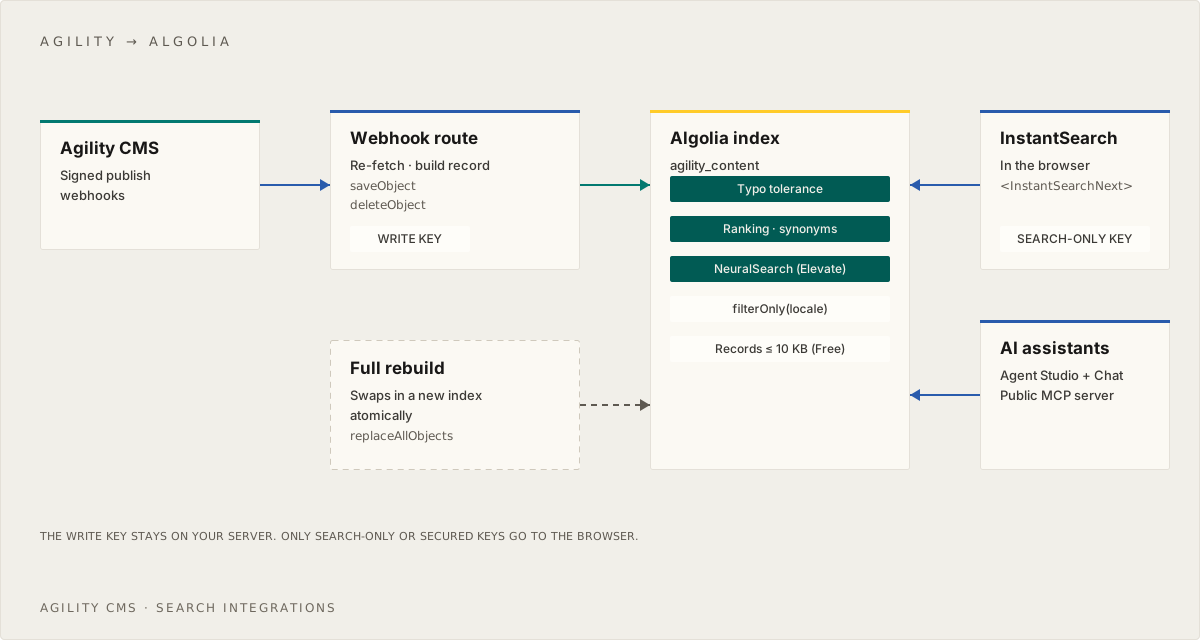
Index Agility content in Algolia with signed webhooks and the v5 client, then build search with React InstantSearch — plus Algolia's AI options.
Algolia is a hosted search API that returns results in milliseconds, with ready-made UI libraries for React, Vue and JavaScript. Agility manages and publishes your content. Algolia helps your visitors find it.
This guide builds on Indexing Agility Content for Search. Read that first. It covers the webhook, signature verification, re-fetching from the Fetch API, deletes and the full reindex, which are the same for every provider. This guide adds the Algolia-specific parts. It indexes one record per section of each page, and shows the query settings that let AI agents and chatbots search in full sentences.
Following the previous version of this guide? It used the v4
algoliasearchclient, which Algolia stopped supporting on 14 August 2026, and it didn't verify webhook signatures. See Upgrading from the previous guide.
Before you start
- An Algolia account and application (sign up). The Free plan is enough to build and test with. If you host on Vercel, the Algolia integration on the Vercel Marketplace creates the application and adds the keys to your project for you.
- From Settings > API Keys in the Algolia dashboard: your Application ID, your Search API key, and a Write API key. Create a key with only the
addObject,deleteObject,browseandsettingspermissions for your webhook. Don't use the Admin key. - An Agility webhook with secure delivery on, set up as described in the indexing guide.
npm install algoliasearch react-instantsearch react-instantsearch-nextjs
# .env.local
ALGOLIA_APP_ID=...
ALGOLIA_WRITE_API_KEY=...                 # server only: webhook + reindex
ALGOLIA_INDEX=agility_content
NEXT_PUBLIC_ALGOLIA_APP_ID=...            # the same Application ID, exposed to the browser
NEXT_PUBLIC_ALGOLIA_SEARCH_API_KEY=...    # the Search API key — safe in the browser
ALGOLIA_SEARCH_API_KEY=...                # the same Search API key, for server-side search
Configure the index
This guide indexes one record per section of each page or item, as the indexing guide describes, and lets Algolia collapse them back to one result per page. Each record looks like this:
{
  "objectID": "en-us-content-39-s2",
  "parentId": "en-us-content-39",
  "agilityId": 39,
  "title": "Verifying Signed Webhooks",
  "heading": "Verify the signature",
  "anchor": "#verify-the-signature",
  "position": 2,
  "body": "Pass the raw request body and the webhook headers to ...",
  "description": "How to check that a webhook really came from Agility.",
  "url": "/docs/developers/verifying-signed-webhooks",
  "locale": "en-us",
  "kind": "content",
  "updatedAt": 1790000000
}
Run this once (and again whenever you change it). It tells Algolia which attributes to search, in what order of importance, how to group sections, and which attributes you'll filter on:
// scripts/configure-algolia.ts
import { algoliasearch } from "algoliasearch"

const client = algoliasearch(process.env.ALGOLIA_APP_ID!, process.env.ALGOLIA_WRITE_API_KEY!)

await client.setSettings({
  indexName: process.env.ALGOLIA_INDEX ?? "agility_content",
  indexSettings: {
    // Earlier = more important. unordered(): a match late in the body counts as much as an early one.
    searchableAttributes: ["title", "heading", "unordered(body)", "description"],

    // One hit per page: group sections by their parent and return the best one
    attributeForDistinct: "parentId",
    distinct: true,

    attributesForFaceting: ["filterOnly(locale)", "filterOnly(parentId)", "kind", "referenceName"],
    attributesToSnippet: ["body:30"],
    customRanking: ["desc(updatedAt)"], // on a tie, prefer newer content
  },
})
Why these settings:
searchableAttributesputs the page title first and the section heading second, so a query that names a topic finds the page and then the right part of it.unordered(body)stops Algolia from favouring words that happen to appear early in a section.descriptioncomes last because every section of a page repeats it.attributeForDistinct: "parentId"withdistinct: truereturns only the best-matching section of each page. Without it, one long page can fill the first page of results.distinctis ignored ifattributeForDistinctisn't set.filterOnly(parentId)lets the write code below find every section of a page when it updates or deletes it.
For more than one locale, consider one index per locale (agility_content_en-us) so you can set language-specific settings such as queryLanguages and indexLanguages. Otherwise, filter on locale as shown below.
Write to the index
This is the searchIndex object the webhook route and the reindex script import. It splits each record with toSections from the indexing guide, writes the sections, and then removes any sections the page no longer has:
// lib/search/provider.ts
import { algoliasearch } from "algoliasearch"
import type { SearchRecord } from "./types"
import { toSections, type SectionRecord } from "./sections"

const client = algoliasearch(process.env.ALGOLIA_APP_ID!, process.env.ALGOLIA_WRITE_API_KEY!)
const indexName = process.env.ALGOLIA_INDEX ?? "agility_content"

const toObject = (s: SectionRecord) => ({
  ...s,
  objectID: s.id,
  updatedAt: Math.floor(Date.parse(s.updatedAt) / 1000), // numeric, so it can be used for ranking
})

/** The objectIDs of every section currently indexed for one page or item. */
async function sectionIds(parentId: string) {
  const ids: string[] = []
  await client.browseObjects<{ objectID: string }>({
    indexName,
    browseParams: { filters: `parentId:"${parentId}"`, attributesToRetrieve: ["objectID"] },
    aggregator: (res) => {
      ids.push(...res.hits.map((h) => h.objectID))
    },
  })
  return ids
}

export const searchIndex = {
  async upsert(record: SearchRecord) {
    const objects = toSections(record).map(toObject)
    if (objects.length) await client.saveObjects({ indexName, objects })

    // A heading removed since the last publish leaves an old section behind
    const keep = new Set(objects.map((o) => o.objectID))
    const stale = (await sectionIds(record.id)).filter((id) => !keep.has(id))
    if (stale.length) await client.deleteObjects({ indexName, objectIDs: stale })
  },

  async upsertMany(records: SearchRecord[]) {
    const objects = records.flatMap((r) => toSections(r).map(toObject))
    if (objects.length) await client.saveObjects({ indexName, objects })
  },

  async remove(id: string) {
    const ids = await sectionIds(id)
    if (ids.length) await client.deleteObjects({ indexName, objectIDs: ids })
  },
}
Plug this into the route handler and reindex script from the indexing guide, and publishing in Agility now updates Algolia.
A few things to know:
- Writes are asynchronous. Each call returns a
taskIDas soon as Algolia has accepted the change, and the record is searchable a moment later. There's no need to wait in a webhook handler. When a script needs the change to be live before continuing, useclient.waitForTask({ indexName, taskID }). - Browse and delete, not delete-by-filter. Algolia's
deleteBywould also work, but Algolia describes it as resource-intensive and recommends getting the object IDs with a browse and deleting them in a batch, which is whatsectionIdsanddeleteObjectsdo. The write key needs thebrowsepermission for this. - Record size. Algolia limits the size of each record: 10 KB on the Free plan, more on paid plans. Sections are usually far below that, so there's no need to cut the body short. If a very long section ever exceeds it, split that section at paragraphs rather than truncating it, so the end of the text stays searchable.
- Keep code blocks.
toTextin the indexing guide keeps the text of code samples. Leave it in: developers often search for a function or setting name that only appears in code.
Rebuilding the whole index
For a clean rebuild, replaceAllObjects writes everything to a temporary index and then swaps it in atomically, so search never shows a half-built index:
await client.replaceAllObjects({ indexName, objects: allRecords.flatMap((r) => toSections(r).map(toObject)) })
Collect allRecords with the Sync API loop from the indexing guide. Be aware that it copies your index settings, rules and synonyms along with the records, and a very large rebuild temporarily doubles your record count.
Answer questions from AI agents and chatbots
People type keywords: "webhook retries". AI agents and chatbots ask in sentences: "can I schedule content to publish later". With Algolia's defaults, every word of the query has to match, so a sentence full of words like "can", "I" and "later" often matches nothing at all. On the Agility docs, that exact question returned 0 results, even though a page answers it.
Four query parameters fixed zero-result questions for agent traffic on our docs:
// lib/search/agent-search.ts (server only)
import { algoliasearch } from "algoliasearch"

const client = algoliasearch(process.env.ALGOLIA_APP_ID!, process.env.ALGOLIA_SEARCH_API_KEY!)

export async function searchForAgent(query: string, locale = "en-us") {
  const res = await client.searchSingleIndex<{ title: string; heading: string; url: string; anchor: string }>({
    indexName: process.env.ALGOLIA_INDEX ?? "agility_content",
    searchParams: {
      query,
      filters: `locale:"${locale}"`,
      hitsPerPage: 10,
      queryLanguages: ["en"],              // which language's stop words and plurals to use
      removeStopWords: true,               // drop filler words such as "can", "I", "the"
      ignorePlurals: true,                 // "webhook" also matches "webhooks"
      removeWordsIfNoResults: "allOptional", // if nothing matches every word, match the best subset instead of returning nothing
    },
  })
  return res.hits.map((h) => ({ title: h.title, heading: h.heading, url: `${h.url}${h.anchor ?? ""}` }))
}
removeWordsIfNoResults: "allOptional"does the most. When the full query matches nothing, Algolia treats every word as optional, so results can match any subset of the words instead of all of them.removeStopWordsandignorePluralsuse the languages inqueryLanguages. Set it to your content's language.- These are query parameters, so you can use them for agent and chatbot queries only. They also help people who type full questions. Algolia suggests leaving
removeStopWordsoff for short keyword searches, so test before turning it on for your search box. All four can also be set as index settings.
Pair these settings with an "I don't know" path in your chatbot: when search returns nothing useful, the assistant should say so rather than answer from memory. Build a Chatbot or AI Agent on Your Agility Content covers that side.
How Algolia measured on the Agility docs
We scored Algolia and Azure AI Search on the Agility docs with the same 51 questions. The full table and method are in Measure before you choose. With the four query settings above:
| Algolia index | Right page first | In top 3 | In top 5 | MRR@10 |
|---|---|---|---|---|
| One record per article | 25 | 33 | 36 | 0.577 |
| One record per section (the setup in this guide) | 25 | 32 | 35 | 0.573 |
Splitting into sections did not change Algolia's ranking in our test: the two indexes scored the same. Azure AI Search scored higher on these question-style queries because of how it ranks: its keyword ranking (BM25) gives more weight to rare words (MRR 0.668), and adding vector search, which finds pages that use different words from the question (0.801), and the semantic ranker (0.830) raised it further.
This guide still uses section records, for reasons that held up: each hit lands on the passage that answers the question, so the snippet and the link point to the right heading and a chatbot can quote it; long articles are indexed in full instead of being cut off; and code stays in. If ranking for sentence-style questions matters most to you, evaluate NeuralSearch with your own test set.
Algolia remains a strong choice: it's fast, it needs no server for search, and it has the richest ready-made UI libraries of the providers we document.
Build the search UI
React InstantSearch gives you a search box, results, highlighting, facets and pagination as components. With the Next.js App Router, use InstantSearchNext so results are server-rendered on the first load:
// components/SiteSearch.tsx
"use client"
import Link from "next/link"
import { liteClient as algoliasearch } from "algoliasearch/lite"
import { Configure, Highlight, Hits, SearchBox, Snippet } from "react-instantsearch"
import { InstantSearchNext } from "react-instantsearch-nextjs"

const searchClient = algoliasearch(
  process.env.NEXT_PUBLIC_ALGOLIA_APP_ID!,
  process.env.NEXT_PUBLIC_ALGOLIA_SEARCH_API_KEY!,
)

function Hit({ hit }: { hit: any }) {
  // With distinct on, each hit is the best-matching section of a page: link straight to it
  return (
    <Link href={`${hit.url}${hit.anchor ?? ""}`}>
      <Highlight attribute="title" hit={hit} />
      {hit.heading && <Highlight attribute="heading" hit={hit} />}
      <Snippet attribute="body" hit={hit} />
    </Link>
  )
}

export function SiteSearch({ locale }: { locale: string }) {
  return (
    <InstantSearchNext searchClient={searchClient} indexName="agility_content" insights>
      <Configure filters={`locale:"${locale}"`} hitsPerPage={10} />
      <SearchBox placeholder="Search…" />
      <Hits hitComponent={Hit} />
    </InstantSearchNext>
  )
}
// app/[locale]/search/page.tsx
import { SiteSearch } from "@/components/SiteSearch"

export const dynamic = "force-dynamic"

export default async function SearchPage({ params }: { params: Promise<{ locale: string }> }) {
  const { locale } = await params
  return <SiteSearch locale={locale} />
}
- Search as you type in a header — use InstantSearch's
<Autocomplete>widget (stable since react-instantsearch 7.41). It replaces the separate@algolia/autocomplete-*packages the previous version of this guide used, which Algolia no longer recommends for new projects. - Want a finished UI to drop in? Algolia SiteSearch provides ready-made search, dropdown and "Ask AI" experiences built on InstantSearch. Install them with the shadcn CLI or a CDN script.
- Pages Router? Wrap
InstantSearchinInstantSearchSSRProviderand usegetServerState. See server-side rendering. - Cost: every keystroke in search-as-you-type is one search request, which is what Algolia bills. InstantSearch handles this sensibly, but keep it in mind for high-traffic sites.
- Analytics: the
insightsprop sends click and conversion events, which power Algolia's analytics, AI ranking and Recommend.
Keys in the browser
The Search API key is designed to be public, and it can only search. Anyone can still copy it and query your index directly, bypassing your Configure filters. That matters in two cases:
- Content that some visitors shouldn't see. Don't index it into a public index at all.
- Abuse or scraping. Generate a secured API key on your server, with an expiry, a rate limit and forced filters, and pass that to the browser instead:
const securedKey = client.generateSecuredApiKey({
  parentApiKey: process.env.ALGOLIA_SEARCH_API_KEY!, // a search-only key, never the Admin key
  restrictions: { filters: `locale:"en-us"`, validUntil: Math.floor(Date.now() / 1000) + 3600 },
})
AI search options
- Agent Studio — build a conversational assistant that answers from your Agility index, and add it to your site with InstantSearch's
<Chat>widget. It's available on every plan. For production you connect your own LLM provider (Anthropic, OpenAI, Azure OpenAI, Gemini and others). See Agent Studio. Ask AI is now part of Agent Studio, so build new assistants on Agent Studio rather than the older Ask AI API. - NeuralSearch adds vector search to keyword search and merges the results, which can help when people and agents use different words from your content. It isn't available on every plan. We haven't measured it on the Agility docs, so treat it as an option to evaluate with your own test set (see Measure before you choose).
- MCP — a Public MCP server exposes read-only search over your index to AI agents and assistants. If you use an AI coding assistant, Algolia's DevEx MCP gives it up-to-date client code examples.
Plan features change. See Algolia pricing for what's included in each plan.
Alternatives to a webhook
The webhook integration gives you structured records, updated seconds after publishing. Algolia also offers:
- Crawler — crawls your live site on a schedule and builds records from the rendered HTML, with no code in your app. It's a good fit for a pages-only site search when a delay after publishing is acceptable. You can ask it to recrawl specific URLs, but that's rate-limited, so it doesn't replace webhooks on a busy site.
- Push connector — keeps the webhook, but moves record shaping into a transformation function hosted in Algolia (
saveObjectsWithTransformation). This is useful when non-developers need to change what gets indexed.
Upgrading from the previous guide
If you built from the earlier version of this page:
-
Upgrade to
algoliasearchv5.initIndexis gone, and every method takesindexNameinstead:v4 v5 import algoliasearch from "algoliasearch"import { algoliasearch } from "algoliasearch"import algoliasearch from "algoliasearch/lite"import { liteClient as algoliasearch } from "algoliasearch/lite"index.saveObject(obj)client.saveObject({ indexName, body: obj })index.saveObjects(objs)client.saveObjects({ indexName, objects: objs })index.deleteObject(id)client.deleteObject({ indexName, objectID: String(id) })index.search(query)client.searchSingleIndex({ indexName, searchParams: { query } })See Algolia's upgrade guide.
-
Verify signatures. Turn on secure delivery for your webhook and verify it, as in the indexing guide.
-
Handle unpublishing. Agility sends
Deletedfor both unpublish and delete. The earlier example only handled deletes, and it never sent a response in that branch, so the request hung until it timed out. -
Use locale-aware object IDs and section records. The earlier example used the bare
contentID, so locales overwrote each other. Switching to section records withen-us-content-39-s0style IDs means a full reindex into a fresh index. UsereplaceAllObjects, and apply the new index settings first. -
Move to InstantSearch for the UI.
<Link><a>…</a></Link>also no longer works in current Next.js;Linkrenders the<a>itself. -
Run the full reindex once. The webhook only indexes content published after it was set up.
Troubleshooting
- The webhook returns 400 "Record is too big". One section is over your plan's record size limit. Split that section at paragraphs, as described under Write to the index.
- Agent or chatbot questions return 0 results. Add the four query parameters from Answer questions from AI agents and chatbots.
- One page fills the results. Check that
attributeForDistinctisparentIdanddistinctistruein the index settings. - The webhook returns 403. The write key is missing
addObject,deleteObjectorbrowse, or it's restricted to a different index. - Nothing shows in results. In the Algolia dashboard, open the index and search there. If the records are there, check that
searchableAttributesincludes the fields and that yourConfigure filtersvalue matches the record'slocale. - A result is stale. Check the webhook's History in Agility, then run the reindex. See Debugging.
Need help?
Contact us to talk to an expert about this integration.
On this page