What is your developer-dependent CMS actually costing you? Calculate your costs and get a full report


Overview
How We Built the Google Analytics Page Sidebar with Claude
A behind-the-scenes look at how we added a per-page analytics sidebar to the Google Analytics app for Agility, pairing Claude Code with the Agility Apps SDK docs.
Our Google Analytics app has always lived on the main Agility dashboard: one big chart showing how your whole site is doing. Useful, but when you're editing a specific page, what you really want to know is how is this page doing?
So we added a page sidebar to the app. Open any page in Agility and you get that page's own analytics right beside the editor: active users, new users, page views, average engagement time, and bounce rate, plus a breakdown of top traffic sources and a link to jump straight into Google Analytics.
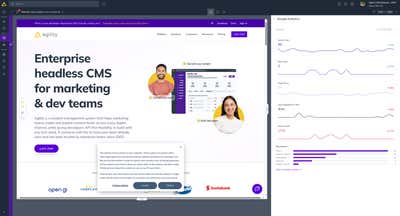
We built the whole thing with Claude Code, and it's a nice case study in what building Agility apps with AI coding tools actually looks like in practice, including the parts where things didn't work on the first try. Here's how it went.
Starting Point: An Existing App and Good Context
This wasn't a greenfield project. The Google Analytics app already existed as a Next.js app using @agility/app-sdk v2, with a home dashboard.
That existing code turned out to be the best context we could give Claude. Instead of describing what an Agility app looks like, we could just say: "Look at how the home dashboard works, and build a page sidebar version of it." The AI picked up on the existing patterns and reused them instead of inventing new ones!
The first prompt produced three things:
- The manifest change. Registering the
pageSidebarcapability inpublic/.well-known/agility-app.json— this is what tells Agility to render the app in the page editor's sidebar. - A new API route,
/api/get-ga-page-sidebar, which runs the same GA4 report as the home dashboard but adds a dimension filter scoped to a singlepagePath. - The sidebar surface itself, a compact layout reusing the app's existing chart components and cumulative-metric helpers.
Iterating in Small Chunks
The feature landed over a handful of focused sessions rather than one giant prompt, which matches the workflow we recommend in our AI coding tools guide:
- Manifest + basic sidebar rendering a filtered report
- Fixing how the page item is obtained (twice!)
- Deriving and normalizing the GA page path
- Polish: sparkline tiles with period-over-period deltas, the top-sources bars, empty and error states, and the "Open in Google Analytics" link
Each chunk was a small, reviewable commit. When something was wrong, it was cheap to throw away and try again, because no single step was precious :-)
What We'd Tell You If You're Doing This
Your existing app is the best prompt. For additions to an existing Agility app, point the AI at the closest existing surface and ask it to follow the same patterns. It will reuse your OAuth flow, your components, your conventions.
Trust the docs, verify the runtime. The Apps SDK docs tell you what surfaces and methods exist, but when behavior doesn't match expectations, inspect the actual messages between the host and your iframe. That's how we found arg.pageItem.
Normalize aggressively at integration boundaries. Agility page URLs and GA4 page paths are different shapes of the same idea. One helper function that pins down the exact expected shape saved us from a class of "why is there no data?" bugs.
Keep secrets server-side. The sidebar's GA calls all go through API routes, same as the home dashboard. The browser never sees the OAuth client secret.
The result is a sidebar that gives editors an immediate answer to "is this page working?" without leaving the CMS — and a build process that took a fraction of the time it would have a couple of years ago.
Related Reading
On this page